
vCalc1.0 - Download
You'll be able to download in few seconds.
Publisher Description
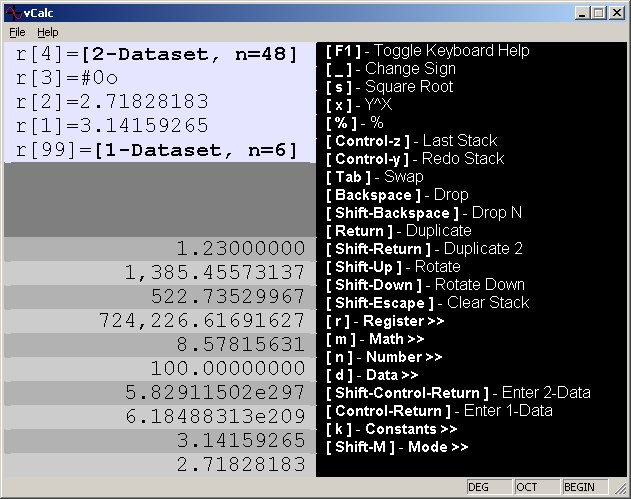
vCalc is a keyboard driven scientific calcualtor,
that works using the RPN notation common in well
known scientific calculators. It supports a complete
set of math, binary and statistical operations.
* Keyboard driven user interface
* Four basic operations on integer and floating point numbers
* 100 memory registers with a real time watch capability
* Exponent, Square Root, %, %T, and Delta %
* Sine, Cosine, Tangent, and their inverses
* Log and antilog in bases 10, e, and 2.
* Floor, Ceiling, Truncate, Round, and Absolute Value
* Factorial/Gamma Function
* 1 and 2 variable statistics with multiple concurrent datasets
* Mean, Standard Deviation, Covariance, Population Covariance, Sum
* Curve Fitting (Linear, Logarithmic, Exponential, and Power)
* Support for 64-bit integer math with bitwise AND, OR, XOR, and NOT
* Display and entry of integers in decimal, hexadecimal, and octal
* Save and Load to disk
* Clipboard Cut, Copy, and Paste
* IEEE-754 compliant math
About vCalc
This program is available in English. It was last updated on 29 September, 2026. vCalc is compatible with the following operating systems: Windows.
The company that develops vCalc is East Coast Toolworks, LLC. The latest version released by its developer is 1.0.
The download we have available for vCalc has a file size of N/A. Just click the green Download button above to start the downloading process. The program is listed on our website since 2003-07-31 and was downloaded 0 times. We have already checked if the download link is safe, however for your own protection we recommend that you scan the downloaded software with your antivirus. Your antivirus may detect the vCalc as malware if the download link is broken.
How to install vCalc on your Windows device:
- Click on the Download button on our website. This will start the download from the website of the developer.
- Once the vCalc is downloaded click on it to start the setup process (assuming you are on a desktop computer).
- When the installation is finished you should be able to see and run the program.
Program Details
System requirements
Download information
Pricing
Version History
version 1.0
posted on 2003-07-31
Disclaimer
External Download
We do not host vCalc on our servers. We did not scan it for viruses, adware, spyware or other type of malware. This app is hosted by the software publisher and passed their terms and conditions to be listed there. We recommend caution when installing it.
The external download link for vCalc is provided to you by apps112.com without any warranties, representations or guarantees of any kind, so access it at your own risk.
If you have questions regarding this particular app contact the publisher directly. For questions about the functionalities of apps112.com contact us.
